Start/Join Meeting
After initializing ProCONF, you can start or join a meeting using the startMeeting and joinMeeting functions. These functions allow for various optional parameters to customize the meeting experience.
NOTE: The moderator is responsible for starting the meeting. Members can join the meeting once it has been started. This needs to be handled from the client side.
Start Meeting
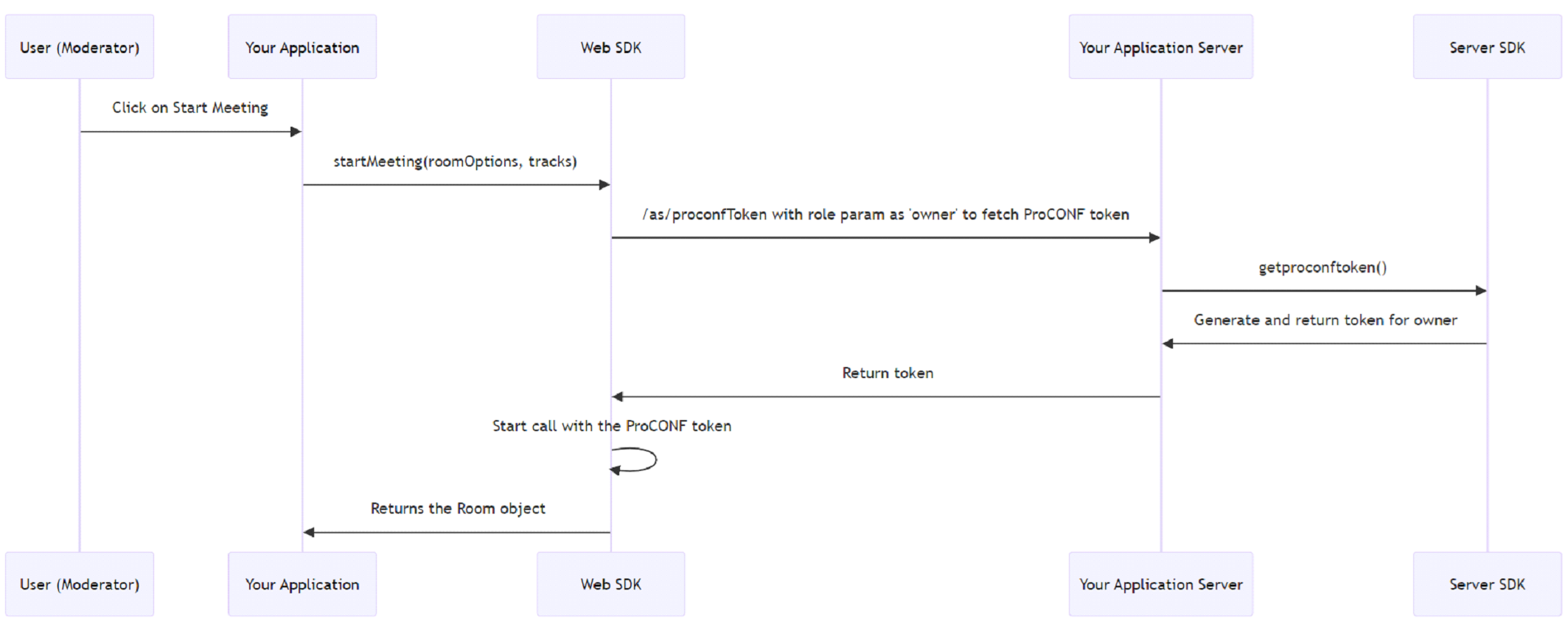
To start a meeting, use the startMeeting method with optional parameters.
Optional parameters:
roomOptions:participantName(optional): Display name of the participant. If not provided, a random name will be generated.roomName(optional): Name of the meeting room. If not provided, a random room name will be generated.
tracks: Audio and video tracks returned bycreateMediaTracks.
Usage Examples:
Example 1: Start a meeting without participant name or room name
This example demonstrates how to start a meeting without specifying a participant name or room name. The system will generate random values for these parameters.
proconfManager
  .startMeeting()
  .then((room: Room | null) => {
    if (room) {
        // Successfully created room
        console.log(room);
    }
  })
  .catch((error) => {
    console.error('Error creating room:', error);
  });
Example 2: Start a meeting with participant name and room name
This example shows how to start a meeting by specifying a participant name and room name.
proconfManager
  .startMeeting({ roomName: 'myRoom', participantName: 'John Doe' })
  .then((room: Room | null) => {
    if (room) {
        // Successfully created room
        console.log(room);
    }
  })
  .catch((error) => {
    console.error('Error creating room:', error);
  });
Example 3: Start a meeting with specific tracks
This example demonstrates how to start a meeting by providing specific audio and video tracks. First, generate the tracks using createMediaTracks, then pass these tracks to startMeeting.
const TRACKS = await proconfManager
  .createLocalTracks({ videoName: 'MyVideoTrack', audioName: 'MyAudioTrack' });

proconfManager
  .startMeeting({}, TRACKS)
  .then((room: Room | null) => {
    if (room) {
        // Successfully created room
        console.log(room);
    }
  })
  .catch((error) => {
    console.error('Error creating room:', error);
  });
Join Meeting
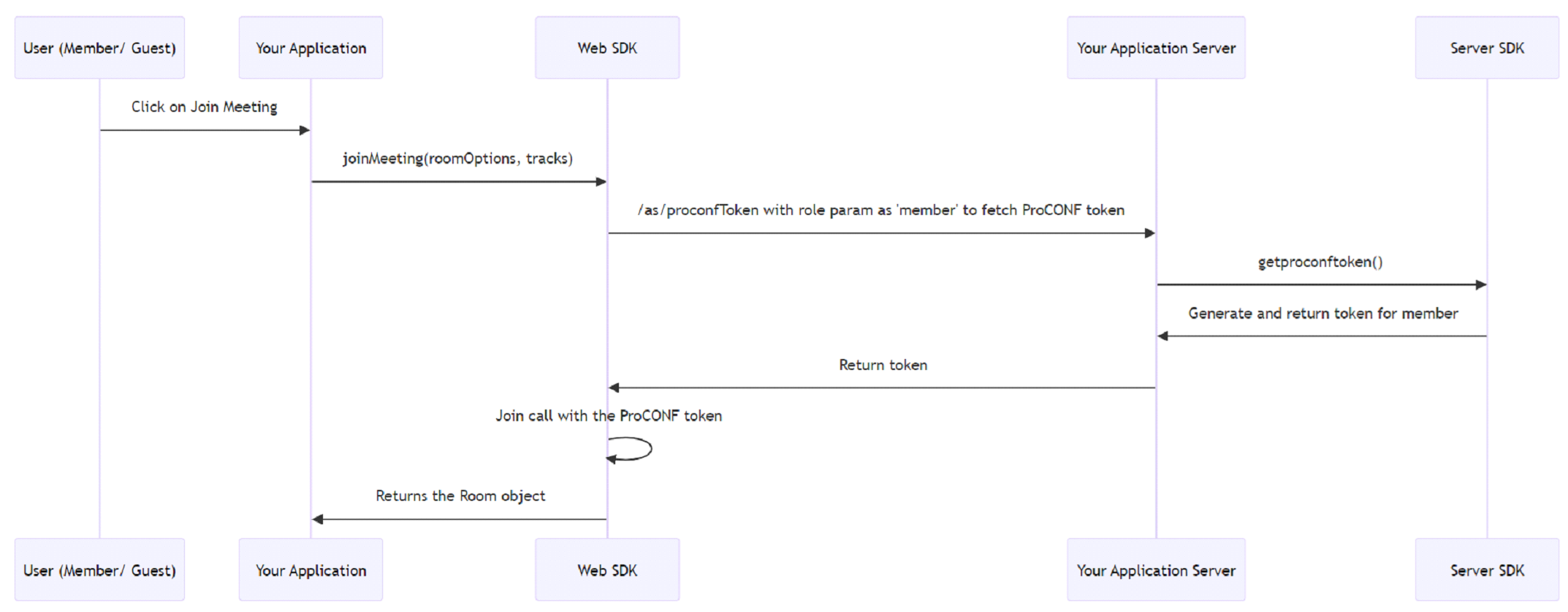
The joinMeeting method allows users to join an existing meeting. It accepts similar optional parameters as startMeeting.
Optional parameters:
roomOptions:participantName(optional): Display name of the participant. If not provided, a random name will be generated.roomName(optional): Name of the room to join.
tracks: Audio and video tracks returned bycreateMediaTracks.
Usage Examples:
proconfManager
  .joinMeeting()
  .then((room: Room | null) => {
    if (room) {
        // Successfully joined room
        console.log(room);
    }
  })
  .catch((error) => {
    console.error('Error joining room:', error);
  });
Note: If the meeting has not yet started, the joinMeeting method will not allow members to join the meeting.
This comprehensive overview provides the necessary details to effectively use the startMeeting and joinMeeting methods with ProCONF.