Handling Remote Participants
Getting Remote Participants
Before we begin, the following flow diagram explains the process for remote participants to join the room.
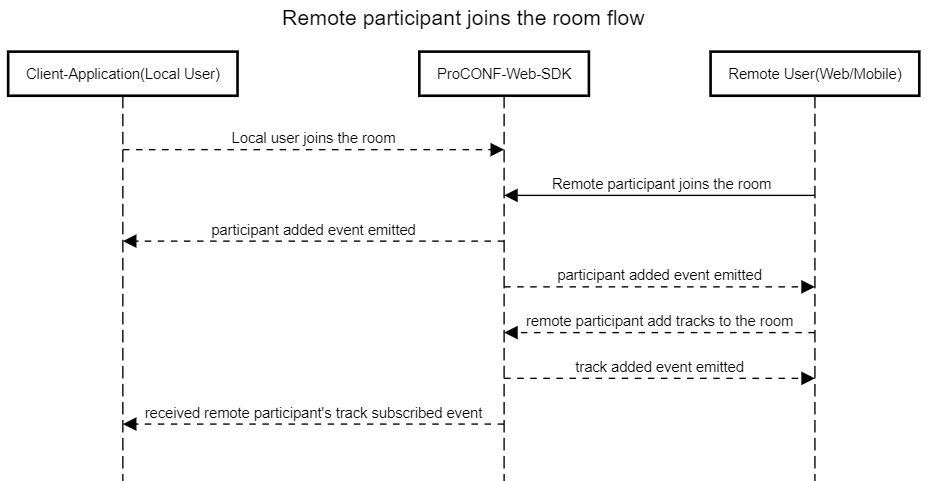
Managing Existing Participants
Upon joining a room, there may be participants already present. These participants are listed in the room.participants array. To access information about these participants, you can iterate over the array and retrieve the necessary details.
room.participants.forEach((participant) => {
  // Here you can access information about each remote participant
});
Participant Updates
Upon joining a room, participants may continue to join or leave. To stay updated on newly added participants, you can listen for the PROCONF_EVENTS.PARTICIPANT_CONNECTED event. This event provides information about participants who have recently joined the room. The media tracks of the participant can be captured using the PROCONF_EVENTS.TRACK_SUBSCRIBED event on the remote participant object
room.on(PROCONF_EVENTS.PARTICIPANT_CONNECTED, (participant) => {
  // Information about newly added participant
  participant.on(PROCONF_EVENTS.TRACK_SUBSCRIBED, (track) => {
    // handle remote participant track
  });
});
Similarly, to monitor participants leaving the room, you can listen for the PROCONF_EVENTS.PARTICIPANT_DISCONNECTED event.
room.on(PROCONF_EVENTS.PARTICIPANT_DISCONNECTED, (participant) => {
  // Information about participant who left
});
Managing Participant Media Update
After a remote participant joins, the participant may update (mute/ unmute) their video or audio stream. To capture the updated stream status , we need to listen to PROCONF_EVENTS.ENABLED and PROCONF_EVENTS.DISABLED events. These events will be listened to on the RemoteTrack, the tracks that we obtain from remote participant.
participant.tracks.forEach((remoteTracks) => {
  // Audio/video unmute or turn on
  remoteTracks.track.on(PROCONF_EVENTS.ENABLED, () => {
    if (remoteTracks.track['kind'] === 'video') {
      // Camera stream status changed to enabled/ unmuted
    }
    if (remoteTracks.track['kind'] === 'audio') {
      // Audio stream status changed to enabled/ unmuted
    }
  });

  // Audio/video mute or turn off
  remoteTracks.track.on(PROCONF_EVENTS.DISABLED, () => {
    if (remoteTracks.track['kind'] === 'video') {
      // Camera stream status changed to disabled/ muted
    }
    if (remoteTracks.track['kind'] === 'audio') {
      // Audio stream status changed to disabled/ muted
    }
  });
});
Note: If we receive the PROCONF_EVENTS.DISABLED event, we detach the video from HTML.