ProCONF Architecture Implementation
Introduction
This is a technical document describing the AWS components and specifications required to achieve a solution that addresses the specific business and technical requirements of the design.
The guide provides step-by-step instructions for the implementation of the architecture design. This guide includes detailed information about how to implement and configure all the associated resources.
Architecture Diagram
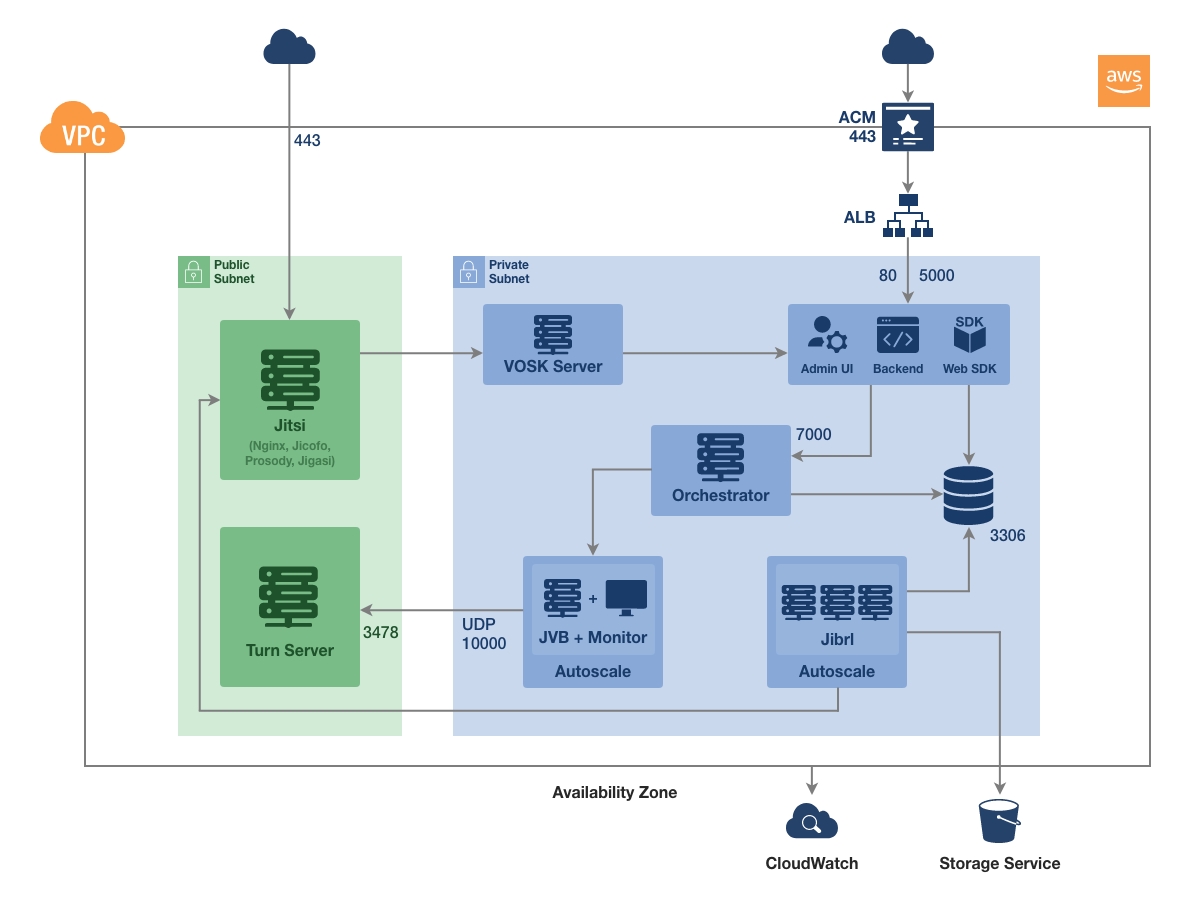
Glossary
| Sr. No | Term | Description |
|---|---|---|
| 1 | SDK Server | Server-Side SDK for Client. |
| 2 | App Server | ProCONF App server has both the ProCONF backend node application and UI application deployed in it. |
| 3 | Orchestrator | A NodeJS application intended to manage the Cluster and provide suitable JVB instances to Jitsi. |
| 4 | Jitsi | Jitsi is a collection of free and open-source multiplatform voice, video conferencing and instant messaging applications for the Web platform, Windows, Linux, macOS, iOS and Android. |
| 5 | Turn Server | A shared database to hold latest stats of the entire Cluster. |
| 6 | JVB + Monitor | Jitsi Video Bridge (JVB) is a vital component of the Jitsi conferencing system. It acts as a bridge, managing the distribution of audio and video streams among participants in a video conference. Monitor is another component to get metrics from JVB. |
| 7 | CloudWatch | AWS CloudWatch is a monitoring tool that provides visibility into the performance of your AWS resources and applications. |
| 8 | RDS | Database required for App Server & Orchestrator. |
| 9 | ALB | Application Load Balancer for SDK & App Server. |
| 10 | ACM | Amazon Certificate Manager for SSL to ALB. |