Overview
Admin control acts as a backbone of our proconf architecture.
Admin Control manages all the details about meeting metadata, configuration details, meeting status, etc. Under the database.
The complete backend database of proconf is managed by the Admin Control component.
It also exposes the endpoints to fetch the meeting metadata, call catchup, summary, etc.
The following endpoints are exposed by Admin Control.
- "/proconf-token"
- "/configuration"
- "/sessions-status"
- "/call-catchup"
- "/call-summary"
- "/meetings"
The client Application(Android/Web/IOS ) can not directly access the Admin Control endpoints.
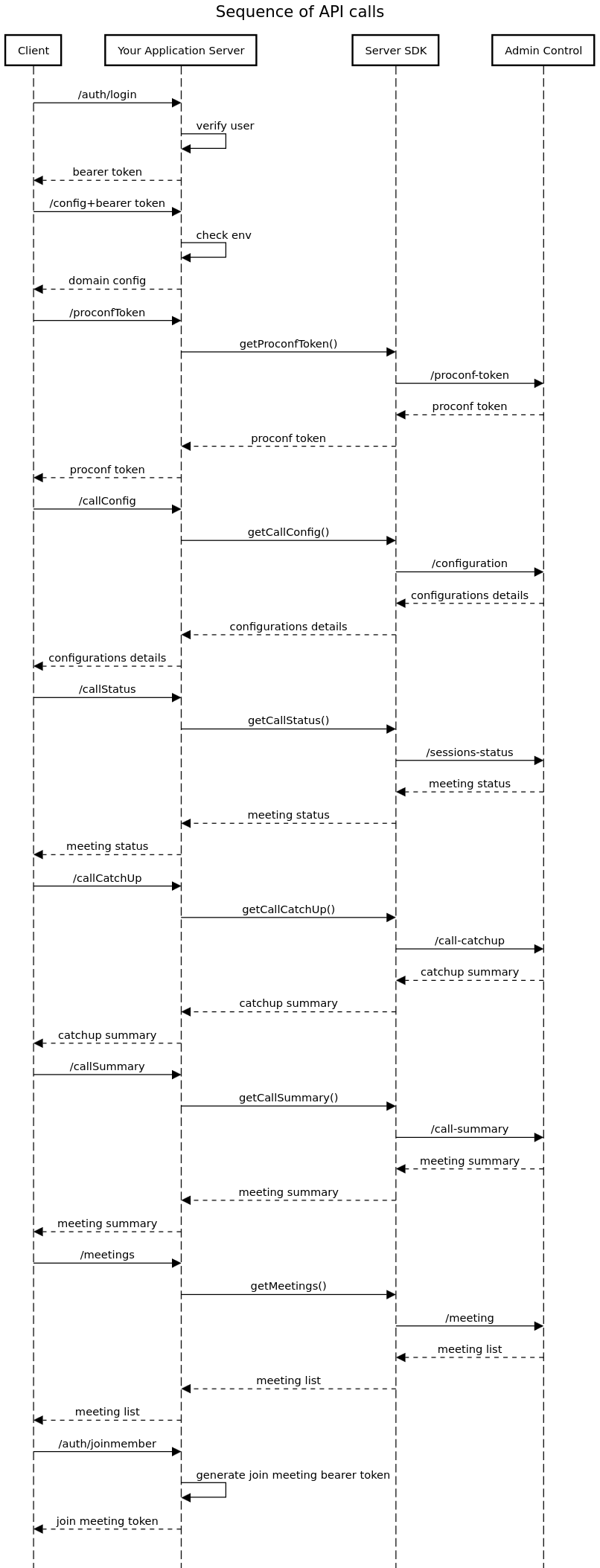
To access Admin Control endpoints it must go through Your Application Server as Admin Control and Your Application Server are deployed under the same VPC. Please refer to this diagram.
The client application and the Admin Control are interfaced with by the Your Application server. It allows the client application to access the admin control endpoints by exposing its endpoints to the client application.
To provide security to Admin Control APIs, “Your Application Server” must implement some authentication mechanism so that only authenticated users can access the endpoints. It must provide a “sign in/login” API to authenticate the user for further API calls. ( For e.g JWT token authentication).
Your application server must expose the following endpoints to the client application.
- "/auth/login"
- "/proconfToken"
- "/callConfig"
- "/callStatus"
- "/callCatchUp"
- "/callSummary"
- "/meetings"
- "/auth/joinmember"
For implementation details please refer to API section.