Overview
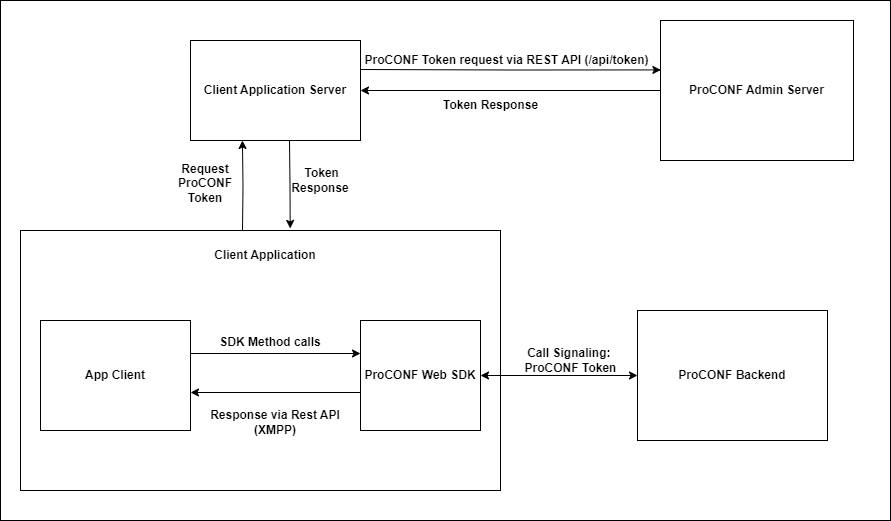
Components of SDK
ProConfManager: This is the main singleton instance. Through this, you can access all the key classes such asRoom,Tracks, and more.Room: This represents a video call room and holds all the key functionalities that can be performed during a video conference. Features include audio/video control, screen sharing, and other foundational elements necessary for a video application.Tracks: This component is responsible for managing audio and video tracks.Room.localParticipant: Represents the local user in the room. The local Participant handles functionalities such as muting audio or turning off the camera.Room.participants: Represents all remote participants in the room. Each participant manages the corresponding audio, video, and data tracks.
Setup for Development
Follow these steps to set up the development environment for using the ProCONF Web SDK.
Steps:
- Get the ProCONF SDK distribution:
- Download the SDK, e.g.,
proconf-web-sdk-0.0.1.tgz.
- Download the SDK, e.g.,
- Extract the distribution:
- Untar the distribution file:
tar -xzf proconf-web-sdk-0.0.1.tgz
- Untar the distribution file:
- Link the application with the SDK locally:
- Install the SDK as a dependency for your application:
npm install <path-to-sdk-distribution> - To confirm the installation, check that the
node_modulesfolder contains a symlink to the SDK distribution.
- Install the SDK as a dependency for your application:
Start building your ProCONF Video Calling application with our easy-to-follow guides!
By following these steps, you will be set up to start developing applications with the ProCONF Web SDK, leveraging its robust set of features for video conferencing.
This expanded and detailed overview will help you understand the components and the setup process for using the ProCONF SDK effectively.